Warm call transfers: You decide before you pick up.
Most phone systems put callers straight through or send them to voicemail. With Call Sure's warm call transfers, your virtual receptionist checks with you first: one ring, a private briefing, and your choice.
One call, three moments
What the caller hears, what you hear.
Your assistant already has the caller's name and reason before it tries anyone. The caller never hears your side of the decision.
-
1 · The caller
Megan waits on hold
Anna already has her name and the reason for the call. Megan hears hold music, never your conversation with Anna.
-
2 · Your phone rings once
Harbour Plumbing & Gas
Only you hear this part
"Hi, it's Anna from Harbour Plumbing & Gas. I have Megan on the line calling about a blocked kitchen drain. Say yes or press 1 to take the call. Say no or press 2 and I'll take a message."
1
"Yes, put her through"
2
"No, take a message"
-
3a · You accept
You're straight through
Same call, no second ring. Megan is connected to you and Anna steps away.
3b · You decline or miss it
Handed back to your assistant
Megan goes back to Anna, who takes a message instead of sending her to voicemail.
Nobody is ever rung outside your business hours. After hours, your assistant still answers and takes the message, so your evenings stay yours.
The whisper
A private briefing, before you say a word.
When you answer, you hear your assistant, not the caller. It tells you who is calling, their company if they gave one, and what it's about.
Accept by voice or keypad
Say "yes" or "put them through", or press 1. You're connected on the same call, with no second ring.
Decline the same way
Say "no" or "take a message", or press 2. The caller goes back to your assistant, which takes a message.
Not sure what you said?
If your answer isn't clear, it asks once more. If it still can't tell, it treats it as a no and takes a message.
Recording, if you record whole calls
When you record the whole call, the whisper tells you so before you accept.
What you hear
"Hi, it's Anna from Harbour Plumbing & Gas. I have Megan on the line calling about a blocked kitchen drain. Say yes or press 1 to take the call. Say no or press 2 and I'll take a message."
If it can't tell a person from a voicemail
"... Press 1 to take the call, or press 2 and I'll take a message."
When you can't take it
Declined or missed, it goes back to your assistant.
Whatever happens on your end, the caller is handed back to your assistant to leave a message, rather than ending up in your voicemail.
You say no
Your phone hangs up and the caller goes back to your assistant, which picks up where it left off.
You don't answer
If your phone rings out, the caller is handed back the same way. The caller hears hold music while it rings.
Your line is busy
Already on a call? The caller goes straight back to your assistant to leave a message.
Your voicemail answers
The transfer counts as missed and the caller goes back to your assistant, not into your voicemail box.
If the caller hangs up while on hold, your phone stops ringing.
Who gets the call
The right person, only when they can take it.
Your team and departments
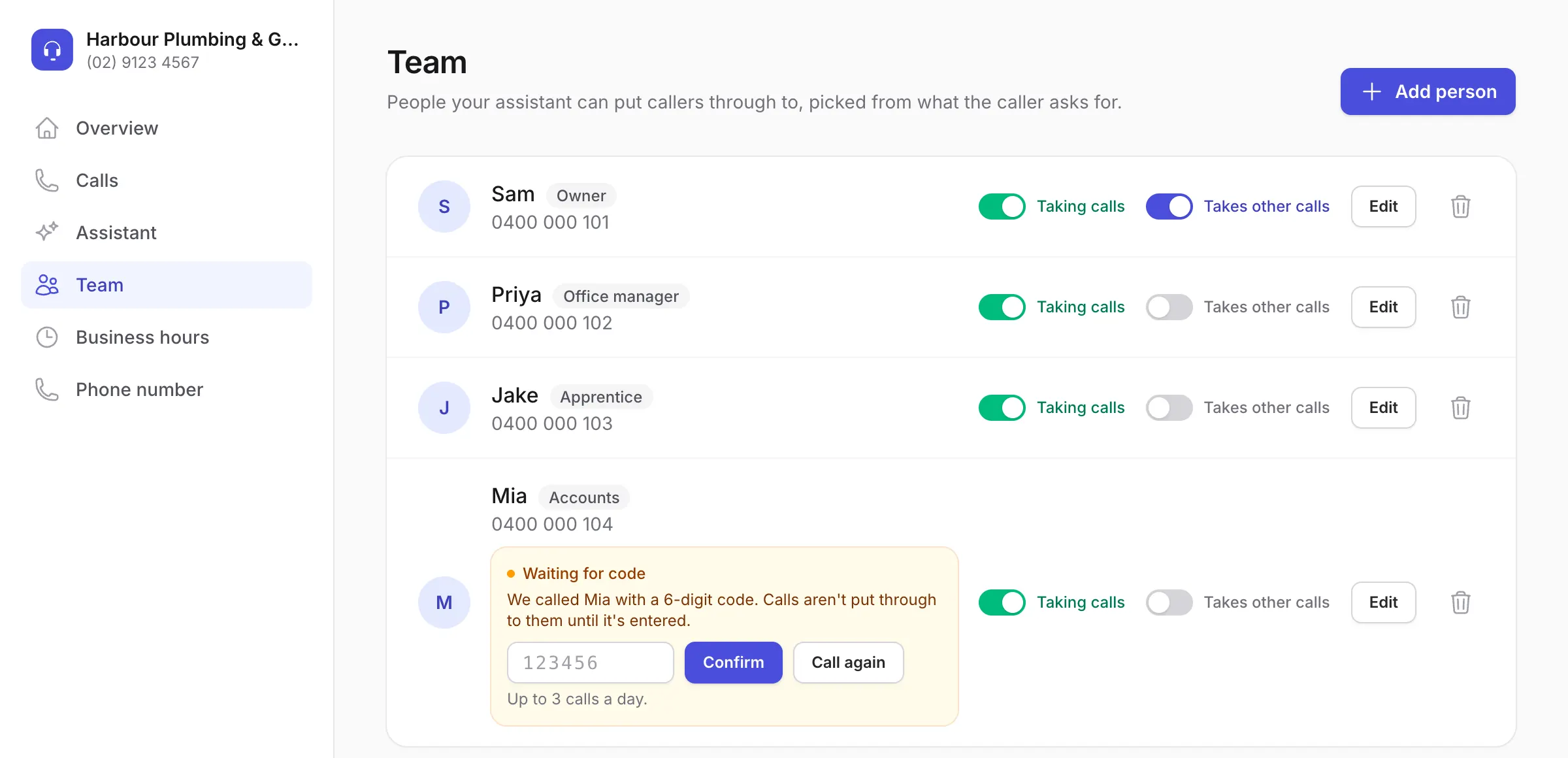
Add people with their role: office, accounts, the boss. Callers reach the right one by name or by what they need.
A catch-all for everything else
Mark someone "takes other calls" and anything that doesn't match a name or department goes to them.
Business hours, day by day
Set different hours for each day. Inside them, calls can be put through. Outside them, nobody is rung and messages are taken.
Team phones confirmed first
Each team member's phone is confirmed with a quick code call before a transfer can ring it, so calls never go to a mistyped number.
Switch people on and off
Away for the day? Switch them off in one tap and transfers skip them until you switch them back on.
Your hours decide when calls are put through.
Set hours for each day. If no days are set, calls are never put through: your assistant answers and takes messages instead.
Every attempt, on record
See exactly what happened.
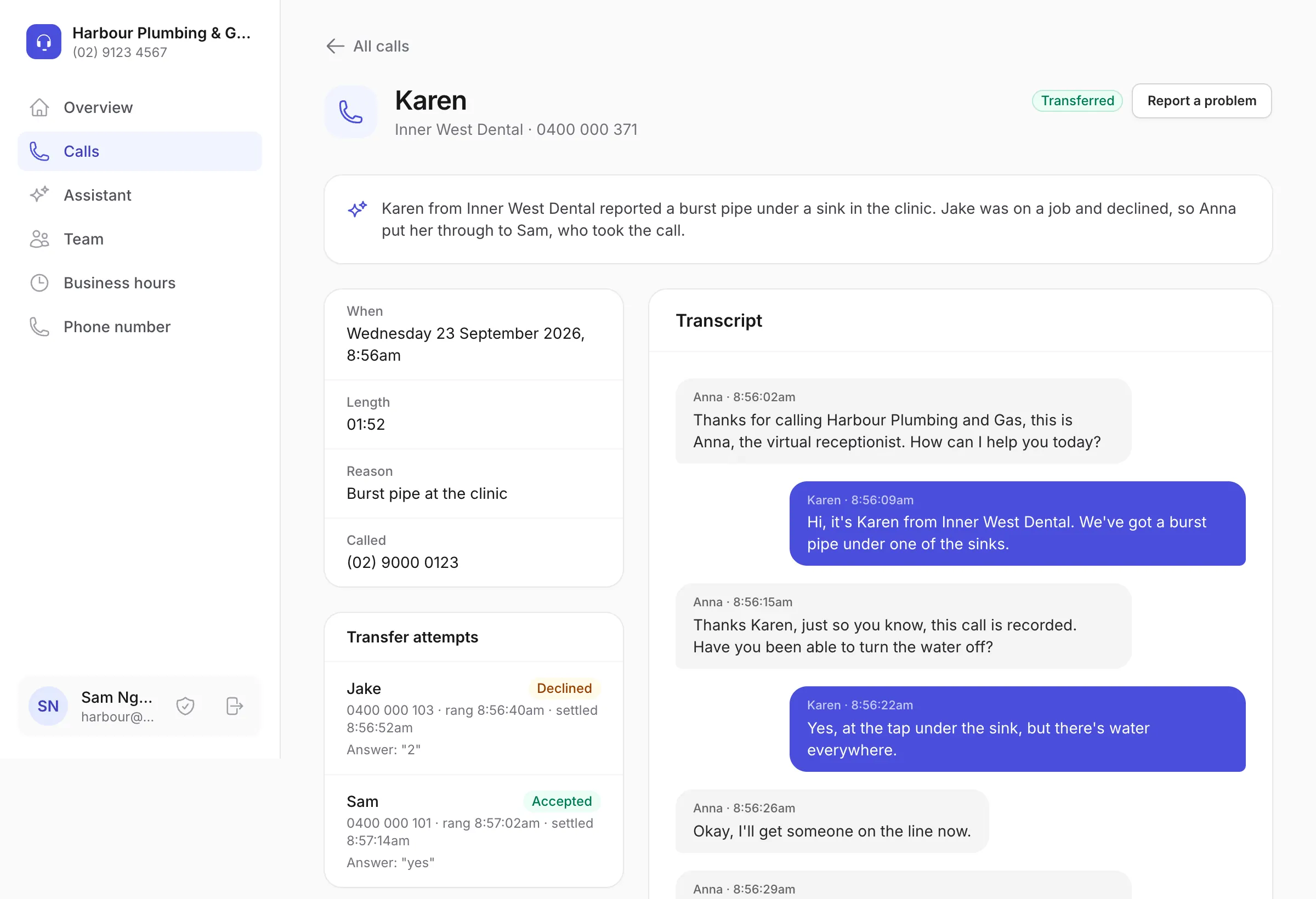
Each call's page lists every transfer attempt: who was rung, whether they accepted, declined or missed it, and when. Here Jake was on a job and declined, so the assistant tried Sam, who took the call.
Hear the whisper on your own phone.
In a demo, add your mobile as a team member, call in and try accepting and declining.
FAQ
Transfers, answered.
Still wondering? Ring 07 3608 1800 and ask our receptionist, or email [email protected].
How does a warm transfer work?
Once your assistant has the caller's name and reason, it puts them on hold and rings the right person on your team. Their phone rings once and they privately hear who is calling and why. They say yes or press 1 to take the call, or say no or press 2 and the caller goes back to your assistant to leave a message.
What if I can't take the call?
Say no, press 2, or just don't answer. The caller goes back to your assistant, which picks up where it left off and takes a message. The same happens if your line is busy.
What if my voicemail picks up?
When your voicemail answers, the transfer counts as missed and the caller goes back to your assistant. If it isn't clear whether a person or a voicemail answered, you have to press 1 to take the call, which a voicemail greeting can't do.
Who does it put calls through to?
The people you add on the Team page, each with their role or department. Callers reach someone by name or by what they need, and you can mark one person "takes other calls" for anything else. Only team members who are switched on, and whose phone has been confirmed, are rung.
What happens after hours?
Your assistant still answers, day and night, weekends included. Outside the hours you set, nobody's phone rings: it takes a proper message instead, ready for you in the morning.
How do minutes work?
Each call counts its length, rounded up to the next minute, including time spent on a transfer. Your plan's minutes reset every month, and extra minutes are charged at your plan's rate. Set a spending limit and you are never charged past it: once it is reached, your assistant keeps answering and taking short messages, but doesn't put calls through for the rest of the billing period. Those calls aren't charged. In the rare case they add up to a lot of minutes, your calls go straight to your first team member during business hours instead, so nobody is left unanswered.
See it working for your business.
Book a demo and we'll set up an account in your business's name. Add your own phones, call it, and try a transfer yourself. Or hear our own receptionist right now.